Streaky Marker Brush for Procreate: Adding Authentic Texture to Digital Art
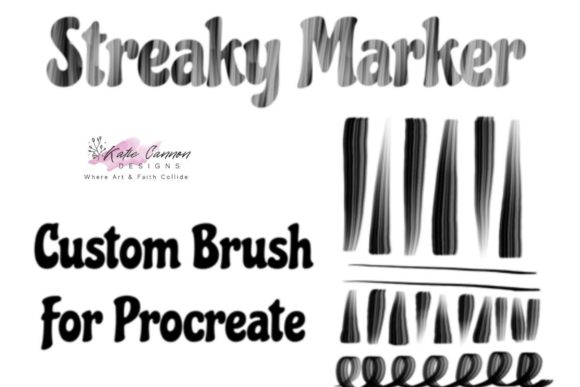
Digital art has come a long way from the sterile, perfectly smooth lines that defined early tablet drawing. Today, artists crave the imperfections of traditional media—the grain of paper, the bleed of ink, and the unpredictable streaks of a drying marker. This is where the Streaky Marker Brush for Procreate steps in. It is not just another tool in your digital arsenal; it is a bridge between the tactile satisfaction of physical art and the limitless flexibility of the iPad. Designed to mimic the organic, uneven flow of alcohol-based markers, this brush introduces a layer of realism that flat digital colors simply cannot achieve on their own.
Understanding what makes this brush unique requires looking beyond its name. It is a textured, handmade brush engineered specifically for the Procreate ecosystem. Unlike generic brushes that rely solely on opacity changes, this tool utilizes complex texture maps and spacing algorithms to replicate the way ink pools and streaks as a real marker runs dry or moves quickly across toothy paper. For artists aged 20 to 50 who may have grown up with Copic markers or Prismacolors, this digital equivalent offers a nostalgic yet efficient workflow. It allows you to retain the soul of hand-drawn illustration while enjoying the benefits of undo buttons, layers, and non-destructive editing.
Real-World Applications for Illustrators and Designers
The versatility of the Streaky Marker Brush for Procreate makes it invaluable across various creative industries. One of the most prominent use cases is in character design and concept art. When developing initial sketches, artists often need to convey mood and volume quickly. Flat colors can feel lifeless during the brainstorming phase. By using this brush, concept artists can add rapid shading and highlight streaks that suggest lighting and form without getting bogged down in rendering every pixel. The textured nature of the stroke helps break up large areas of color, preventing the "digital plastic" look that often plagues amateur portfolios.
Fashion illustrators also find immense value in this tool. Fabric textures, such as denim, silk, or wool, rely heavily on how light interacts with the surface. A standard soft airbrush fails to capture the roughness of denim or the sharp highlights of satin. The Streaky Marker Brush allows fashion designers to sketch garments with a sense of materiality. The streaks can mimic the weave of fabric or the way dye settles into folds, providing clients with a more accurate representation of the final product. This is particularly useful for portfolio pieces where showing an understanding of textile behavior is crucial.
Beyond professional illustration, this brush is a game-changer for digital journaling and bullet journal enthusiasts. The aesthetic of hand-lettered headers and watercolor-style backgrounds is highly sought after in the planning community. However, maintaining consistent handwriting and painting skills daily can be exhausting. Using this brush on an iPad allows users to create beautiful, textured spreads that look handmade but take a fraction of the time. The imperfect edges of the brush strokes add a cozy, human touch to digital planners, making them feel personal rather than templated.
Technical Considerations and Compatibility
Before diving into creation, it is essential to understand the technical requirements. This listing is for one Procreate brush file, which means you must have the Procreate app installed on your iPad. The brush is designed to work on most iPad Pro versions, ensuring that whether you are using an older model or the latest M4 chip device, the performance remains smooth. However, the experience relies heavily on your ability to manage digital files. You will receive a compressed ZIP file. To use the brush, you must have a way to unzip this file directly on your iPad. Most modern iOS versions allow you to tap the ZIP file in your Files app to extract it automatically, but being comfortable with this process is a prerequisite.
Once unzipped, loading the brush is straightforward. You simply tap the extracted file, and it should open directly in Procreate, adding itself to your brush library. This ease of installation is a significant advantage, but it does require a basic level of digital literacy. For those who are new to importing custom assets, taking a moment to watch a quick tutorial on managing files in the iOS Files app can save frustration later. It is also worth noting that because this is a handmade brush, it may behave differently depending on your Apple Pencil settings. Adjusting streamline and pressure sensitivity in Procreate can help you tailor the streak effect to your personal drawing style.
Navigating Strengths and Limitations
Like any artistic tool, the Streaky Marker Brush for Procreate has its strengths and limitations. Its primary strength lies in its ability to add instant character. A single pass can transform a boring flat shape into something that feels touched by human hands. It excels in styles that embrace roughness, such as sketchy urban landscapes, expressive portraits, and children’s book illustrations. The texture helps hide minor mistakes in line work, as the eye is drawn to the interesting variation in the fill rather than perfect geometry.
However, potential users should be aware of its limitations. This brush is not ideal for hyper-realistic rendering where smooth gradients are required. If you are trying to create a photorealistic skin tone or a sleek automotive design, the inherent graininess of the brush may work against you. In such cases, it is better used as an overlay or for initial blocking rather than final detailing. Additionally, because the texture is pre-baked into the brush, scaling the brush size significantly can sometimes alter the appearance of the grain. It is advisable to test the brush at different sizes to find the sweet spot where the streaks look natural rather than pixelated or overly repetitive.
Another consideration is color interaction. Real markers blend physically on paper, creating new hues through layering. While Procreate allows for blending modes, the Streaky Marker Brush does not automatically mix colors like wet paint. Users need to manually layer colors or use the smudge tool to achieve seamless transitions. Understanding this distinction helps manage expectations. The brush provides the look of a marker, but the behavior is still digital. Embracing this hybrid nature allows artists to exploit the best of both worlds: the aesthetic of traditional media with the control of digital software.
Enhancing Your Creative Workflow
Integrating this brush into your workflow can rejuvenate your creative process. For professionals facing burnout, switching to a tool that feels playful and unpredictable can spark new ideas. The unpredictability of the streaks forces you to adapt your drawing style, leading to happy accidents and unique compositions. For hobbyists, it lowers the barrier to entry for achieving professional-looking results. You do not need years of training in traditional marker techniques to produce work that looks authentic and polished.
Ultimately, the Streaky Marker Brush for Procreate is more than a download; it is a stylistic choice. It signals a preference for warmth, texture, and humanity in a digital space. Whether you are designing a logo with a handcrafted feel, illustrating a children's storybook, or simply doodling in your digital diary, this tool offers a tangible connection to the physical act of drawing. By understanding its capabilities and respecting its limitations, you can unlock a new dimension of expression in your digital art journey.