Mastering Digital Texture with Dans Multiline Brush for Procreate
The intersection of traditional artistry and digital precision has long been a sought-after frontier in the creative industry. For years, graphic designers and illustrators have grappled with the sterile perfection of vector lines and the uniform opacity of standard digital brushes. While tools like the iPad Pro and Apple Pencil have revolutionized portability and workflow efficiency, they often lack the organic imperfection that gives hand-drawn work its soul. We have been working with the graphic design world for a long time, observing these shifts closely. Recently, we saw a distinct demand for special materials tailored for professionals who wish to bridge this gap. They want to create digital illustrations that feel tactile, layered, and authentically human.
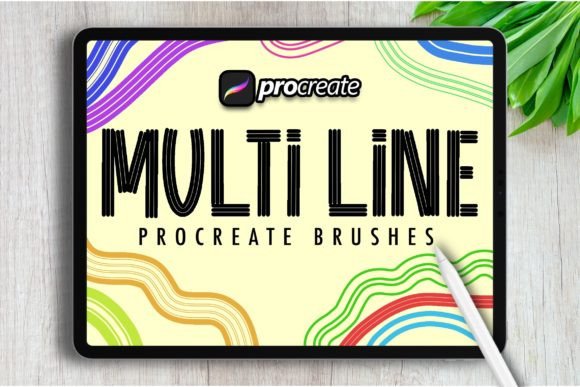
In response to this evolving need, our team dedicated countless hours to researching, testing, and refining handcrafted analog-style resources. The result is a specialized toolset designed specifically for working digitally on Procreate. At the heart of this collection is Dans Multiline Brush, a resource that redefines how artists approach line weight, texture, and depth. This article explores the practical applications, technical advantages, and creative possibilities offered by this unique brush set, providing a comprehensive guide for creators looking to elevate their digital portfolio.
The Evolution of Analog Aesthetics in Digital Spaces
To understand the value of specialized brushes, one must first appreciate the limitations of default digital tools. Standard brushes in most software are engineered for consistency. They produce smooth, predictable strokes that are ideal for technical diagrams or flat design but often fall short when attempting to replicate the warmth of pencil on paper or ink on canvas. The "uncanny valley" of digital art occurs when an image looks almost real but lacks the subtle irregularities of physical media.
This is where the concept of handcrafted analog-style resources becomes critical. By analyzing the micro-textures of real-world materials, we can program brushes that mimic the friction, bleed, and variation of traditional tools. Dans Multiline Brush is not merely a filter; it is a complex algorithmic interpretation of how multiple lines interact when drawn by hand. It introduces controlled chaos into the digital workflow, allowing for strokes that vary in thickness, opacity, and alignment, much like a pen skipping slightly over rough paper or a marker layering ink unevenly.
Why Multiline Dynamics Matter
The term "multiline" refers to the brush’s ability to generate several parallel or intersecting lines within a single stroke. This technique is foundational in sketching, hatching, and cross-hatching, methods used by artists for centuries to build tone and volume. In a digital environment, achieving this effect manually is time-consuming and often results in rigid, unnatural patterns. A multiline brush automates the organic variance, ensuring that no two strokes look exactly alike. This characteristic is vital for maintaining viewer engagement, as the eye is naturally drawn to complexity and variation.
Technical Integration with iPad Pro and Apple Pencil
The hardware ecosystem plays a pivotal role in the performance of any digital brush. The iPad Pro, combined with the Apple Pencil, offers pressure sensitivity, tilt recognition, and low latency that are essential for nuanced drawing. However, hardware alone cannot create style; it requires software resources that leverage these capabilities fully. Our designed brush set allows you to have perfect creation possibilities by mapping the physical input of the Apple Pencil to the dynamic parameters of the brush engine.
When using Dans Multiline Brush, the pressure applied to the screen does not just change the size of the stroke. It alters the spacing between the multiple lines, the roughness of the edges, and the density of the texture. Light pressure might yield a faint, scattered sketch-like line, while heavy pressure produces a bold, saturated mark with defined internal textures. This responsiveness creates a feedback loop between the artist and the device, fostering a sense of connection that is often missing in digital workflows.
- Pressure Sensitivity: Controls line weight and texture density dynamically.
- Tilt Support: Adjusts the angle of the multiline effect for shading and broad strokes.
- Streamline Stabilization: Smooths out hand tremors without sacrificing the organic feel of the stroke.
- Customizable Opacity: Allows for layering effects that mimic transparent inks or watercolors.
Practical Applications for Diverse Creative Roles
The versatility of this brush set extends beyond individual illustrators. Various professionals within the graphic design and content creation spheres can leverage these tools to enhance their output. Understanding the specific use cases helps in integrating these resources effectively into existing pipelines.
Illustrators and Concept Artists
For concept artists, speed and expressiveness are paramount. Dans Multiline Brush enables rapid ideation by allowing artists to block in shapes and textures simultaneously. Instead of laying down a flat color and then adding texture separately, the brush integrates both steps. This is particularly useful in character design, where clothing fabrics, hair strands, and environmental details require varied textural cues to convey material properties quickly.
Graphic Designers and Brand Specialists
In branding, there is a growing trend towards "authentic" visuals that stand out against the polished corporate aesthetic. Designers can use multiline brushes to create custom logos, packaging elements, or social media graphics that feel handcrafted. This approach adds a layer of personality and warmth to brand identities, making them more relatable to consumers. The ability to generate unique, non-repetitive textures ensures that each design element remains distinct and memorable.
Educators and Hobbyists
For those teaching digital art or pursuing it as a hobby, the learning curve of digital tools can be steep. Brushes that mimic familiar traditional media lower this barrier. Students who are accustomed to pencil and paper can transition to the iPad Pro more seamlessly when the tools behave in expected ways. Furthermore, hobbyists find joy in the experimental nature of these brushes, discovering new styles and techniques through play rather than rigid instruction.
Workflow Optimization and Creative Freedom
One of the most significant advantages of using specialized resources like Dans Multiline Brush is the optimization of the creative workflow. Traditional methods of adding texture—such as overlaying scanned paper textures or using separate noise filters—can be destructive to the original artwork or difficult to edit later. By embedding the texture directly into the brush stroke, artists maintain non-destructive flexibility. Each stroke remains editable, allowing for adjustments in size, opacity, and position without losing the intricate details.
This efficiency translates to faster turnaround times for client projects and more time for creative exploration. Designers spend less time troubleshooting technical issues and more time focusing on composition and narrative. The brush set encourages experimentation, as the risk of creating "messy" lines is mitigated by the inherent aesthetic appeal of the multiline effect. What might be considered an error in a standard vector workflow becomes a feature in this analog-inspired environment.
Considerations for Best Results
While the tools are powerful, achieving mastery requires practice. Users should consider the following points to maximize the potential of their digital toolkit:
- Layer Management: Use separate layers for different types of strokes to maintain control over editing and blending modes.
- Canvas Resolution: Work at high resolutions to ensure that the fine details of the multiline texture remain crisp and do not pixelate upon export.
- Color Theory: Experiment with color variations within the multiline strokes. Using slightly different hues for the parallel lines can create a vibrancy similar to pointillism.
- Combination Techniques: Do not rely on a single brush. Combine Dans Multiline Brush with solid fill brushes and erasers to create contrast and focal points.
The Future of Handcrafted Digital Resources
As technology advances, the line between physical and digital creation will continue to blur. The demand for special materials indicates a broader cultural shift towards valuing authenticity and craftsmanship in a digital age. Tools that honor the history of art while leveraging modern convenience are not just trends; they are essential components of the future creative landscape. By investing in high-quality, handcrafted resources, designers and artists equip themselves with the means to produce work that resonates on a deeper, more human level.
The journey from traditional sketching to digital illustration does not require abandoning the former. Instead, it invites us to translate those timeless techniques into new mediums. With the right tools, such as the meticulously designed brush sets available today, the iPad Pro becomes more than a tablet; it becomes a studio, a sketchbook, and a canvas all in one. Embracing these resources allows creators to push boundaries, challenge conventions, and ultimately, tell more compelling visual stories.