Enhancing Digital Lettering with the Calligraphy Single Procreate Brush
In the rapidly evolving landscape of digital art, the tools we choose often dictate the fluidity and authenticity of our work. For artists transitioning from traditional media to tablets, or for seasoned digital illustrators seeking more organic textures, brush selection is critical. The Calligraphy Single Procreate Brush emerges as a specialized tool designed to bridge the gap between rigid digital lines and the expressive nuance of hand-lettered calligraphy. This asset is not merely a decorative add-on; it is a functional instrument intended to streamline the workflow of creators who prioritize precision and aesthetic consistency in their lettering projects.
Understanding the value of this specific brush requires looking beyond its name. It represents a focused approach to digital inking, offering a singular, refined solution rather than an overwhelming library of redundant options. By isolating one high-performance brush, developers aim to provide a reliable staple for your toolkit, ensuring that every stroke behaves predictably across various canvas sizes and resolutions.
The Mechanics of Digital Calligraphy
Traditional calligraphy relies heavily on the physical interaction between nib, ink, and paper. The pressure applied determines the line width, while the angle of the pen affects the serif formation and overall flow. Replicating this digitally is notoriously difficult because standard round brushes lack the dynamic response needed to mimic these subtle variations. The Calligraphy Single Procreate Brush addresses this by utilizing advanced pressure sensitivity algorithms within the Procreate environment.
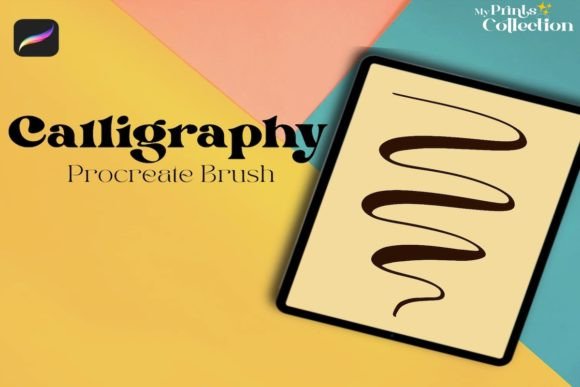
When you engage with this brush, the software interprets the force of your Apple Pencil to modulate the stroke thickness in real-time. Light touches produce delicate hairlines, essential for entry and exit strokes in script lettering, while firmer pressure yields bold, commanding downstrokes. This dynamic range is crucial for maintaining the rhythm and contrast that define professional-quality calligraphy. Unlike generic brushes that may feel sluggish or inconsistent, this tool is calibrated to respond instantly, reducing the latency that often disrupts the creative flow during intricate lettering tasks.
Practical Applications for Creators
The versatility of the Calligraphy Single Procreate Brush extends far beyond traditional wedding invitations or quote graphics. Its utility spans multiple disciplines within the creative industry. For graphic designers, it offers a quick way to add human-centric elements to otherwise sterile vector layouts. Marketers and social media managers can utilize it to create eye-catching headlines that stand out in crowded feeds, leveraging the personal touch of handwriting to build brand connection.
Illustrators find particular value in using this brush for adding annotations, speech bubbles, or decorative flourishes to character designs. Because the brush is optimized for clarity, it remains legible even when scaled down for mobile viewing. Educators and content creators can also benefit by using it to highlight key points in digital worksheets or presentation slides, providing a visual hierarchy that guides the viewer’s attention effectively.
Furthermore, the brush serves as an excellent learning tool for beginners. Since it simplifies the technical setup required to achieve calligraphic effects, new users can focus on mastering letterforms and spacing without struggling against uncooperative software settings. This lowers the barrier to entry for those interested in hand-lettering but intimidated by the steep learning curve of traditional methods.
Technical Compatibility and Requirements
Before integrating any new asset into your workflow, understanding its technical constraints is vital for avoiding frustration. The Calligraphy Single Procreate Brush is distributed as a .brushset file, which is native to the Procreate ecosystem. It is imperative to note that this tool is exclusively compatible with the Procreate app on iPad. It requires Procreate version 5 or higher to function correctly, as earlier versions may lack the necessary engine updates to support the brush’s pressure dynamics and texture rendering.
A common misconception among digital artists is the interchangeability of brush files across different platforms. It is important to clarify that this brush is not compatible with Adobe Photoshop, Illustrator, or other desktop-based illustration software. Attempting to import the .brushset file into these programs will result in errors or unsupported file messages. This limitation underscores the importance of working within the appropriate ecosystem. If your primary workflow involves desktop applications, this specific asset will not serve your needs. However, for iPad-centric creators, the integration is seamless, allowing for immediate use upon installation.
Evaluating Usability and Workflow Integration
One of the strongest attributes of the Calligraphy Single Procreate Brush is its simplicity. In a market saturated with massive brush packs containing hundreds of rarely used tools, a single, well-crafted brush offers a refreshing degree of focus. This minimalism reduces decision fatigue, allowing artists to start creating immediately without sifting through menus. The installation process is straightforward: users simply tap the file on their iPad, and it automatically imports into the Procreate brush library.
Consistency is another hallmark of quality in digital brushes. Poorly constructed brushes often exhibit jagged edges or unpredictable opacity changes when stroke speed varies. Through practical evaluation, this brush demonstrates a smooth edge definition and stable opacity control. Whether you are drawing slow, deliberate curves or fast, energetic swashes, the line quality remains intact. This reliability is essential for professional work where client deliverables must meet high standards of polish.
Moreover, the brush allows for customization. While it performs excellently out of the box, experienced users can tweak settings such as streamline, size jitter, and opacity pressure to suit their personal style. This flexibility ensures that the tool can grow with the artist, adapting to different projects ranging from bold poster headers to fine detailed illustrations.
Who Benefits Most from This Tool?
Identifying whether the Calligraphy Single Procreate Brush fits your needs depends largely on your current workflow and artistic goals. It is ideally suited for:
- Freelance Letterers: Professionals who need a dependable tool for client projects involving quotes, logos, or packaging design.
- Digital Planners and Journalers: Individuals who want to elevate their digital planning aesthetics with elegant, handwritten headers and decorative elements.
- Social Media Content Creators: Marketers looking to add a personal, authentic touch to their visual content without spending hours on complex typography.
- Hobbyists and Students: Beginners seeking an accessible entry point into the world of digital calligraphy without the expense of extensive brush libraries.
Conversely, if your work primarily involves hard-edge geometric design, pixel art, or heavy photo manipulation, this brush may have limited application. It is a specialized tool for organic, flowing lines, not a universal solution for all digital painting needs.
Long-Term Value and Conclusion
Investing in digital assets should always be viewed through the lens of long-term utility. The Calligraphy Single Procreate Brush offers significant value due to its durability and timeless style. Unlike trend-dependent brushes that may fall out of favor, clean calligraphic strokes remain a staple in design. The fact that it is a single-file purchase also means there is no ongoing subscription cost or bloated library to manage.
To maximize the potential of this tool, users are encouraged to watch the instructional video provided in the listing. Understanding the specific nuances of how the developer intended the brush to be used can unlock capabilities that might not be immediately apparent. Practice with varying pressure levels and angles will help you develop muscle memory, leading to more confident and expressive lettering.
In conclusion, the Calligraphy Single Procreate Brush stands out as a practical, high-quality addition to any iPad artist’s toolkit. It balances ease of use with professional-grade performance, making it a worthy consideration for anyone looking to enhance their digital lettering and illustration capabilities. By focusing on core functionality and reliable performance, it delivers exactly what it promises: a fun, creative, and effective way to add detailed, hand-crafted beauty to your digital art.