Triangle Procreate Brush: A Practical Guide for Boho Patterns and Digital Lettering
In the expansive ecosystem of digital art tools, specialized brushes often serve as the bridge between a generic sketch and a polished, professional piece. The Triangle Procreate Brush has emerged as a distinct resource for artists seeking to integrate geometric precision with organic, bohemian aesthetics. Unlike standard round or flat brushes that rely on pressure sensitivity for variation, this tool is designed specifically to create seamless triangular motifs, borders, and patterns. For illustrators, lettering artists, and surface designers, understanding the specific utility of this brush can significantly streamline the workflow when creating repetitive elements.
This article explores the functionality of the Triangle Procreate Brush, evaluates its fit within a broader digital toolkit, and helps you determine whether it aligns with your current creative needs. By examining its technical requirements, use cases, and limitations, you can make an informed decision about adding this asset to your library.
Understanding the Core Functionality
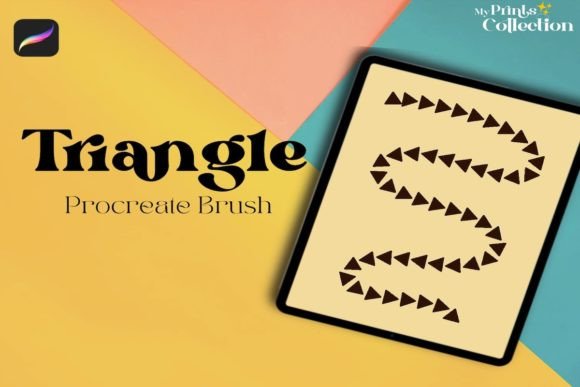
The primary value proposition of the Triangle Procreate Brush lies in its ability to generate consistent, seamless shapes with minimal effort. Traditional methods of drawing triangles—whether using vector tools or manual freehand techniques—can be time-consuming, especially when creating complex borders or all-over patterns. This brush automates the spacing and alignment, allowing the artist to focus on composition rather than geometry.
What makes this tool distinct is its specialization. It is not a general-purpose painting brush; it is a pattern-making engine. When used correctly, it produces a continuous stream of triangular shapes that can be manipulated to form intricate boho patterns. This is particularly useful for:
- Digital Lettering: Adding decorative borders around hand-lettered quotes without breaking the flow of writing.
- Surface Design: Creating repeatable patterns for textiles, wallpapers, or stationery.
- Illustration Accents: Quickly framing subjects or adding texture to backgrounds.
The brush comes as a single .brushset file, which is lightweight (approximately 1 MB) and easy to import. However, its simplicity belies the need for a specific workflow. Users must understand that this is a digital product; no physical item is shipped, and the value is entirely dependent on how well it integrates into your existing iPad-based workflow.
Technical Requirements and Compatibility
Before evaluating the artistic merits, it is crucial to address the technical constraints. The Triangle Procreate Brush is exclusively compatible with the Procreate app on iPad. Specifically, it requires Procreate App version 5 or higher. This requirement ensures that the brush engine can handle the specific stamping and scattering algorithms used to create the seamless effect.
A common point of confusion for new digital artists is cross-platform compatibility. It is important to note that this brush is not compatible with Photoshop, Illustrator, or other desktop-based software. If your primary workflow involves Adobe Creative Cloud or desktop illustration tools, this asset will not serve your needs. This limitation narrows the audience but ensures optimal performance for those within the Apple ecosystem.
Additionally, because this is a digital download, users receive a zip file containing the brush set. The process is straightforward: download, unzip, and tap the file to import it directly into Procreate. There are no installation drivers or complex setups, which reduces friction for users who want to start creating immediately.
Comparing Specialized Brushes vs. General Tools
When deciding whether to invest in a specialized tool like the Triangle Procreate Brush, it is helpful to compare it against alternative approaches. Most artists already have access to basic shape tools or general-purpose brushes. So, why choose a dedicated triangle brush?
Manual Drawing vs. Automated Stamping
Drawing triangles manually offers complete control over each individual shape’s angle and size. This is ideal for organic, imperfect looks where variation is key. However, creating a seamless border or a uniform pattern manually is labor-intensive and prone to inconsistency. The Triangle Procreate Brush sacrifices some individual control for speed and uniformity. If you need a perfect, repeating border in seconds, the specialized brush wins. If you need a chaotic, hand-drawn feel, manual drawing may still be preferable.
Vector Shapes vs. Raster Brushes
Illustrator and other vector programs excel at creating geometric patterns that are infinitely scalable. However, vector workflows can feel rigid and lack the textural warmth associated with boho styles. The Triangle Procreate Brush operates in a raster environment, allowing for texture, opacity variations, and blending modes that mimic traditional media. This makes it a better choice for artists who want a "hand-made" digital look rather than a crisp, corporate geometric aesthetic.
Generic Pattern Brushes vs. Niche Designs
There are many general pattern brushes available in the marketplace. The distinction here is the specific focus on triangular geometry. While a generic scatter brush might offer random shapes, the Triangle Procreate Brush is optimized for interlocking or aligned triangular forms. This specificity saves time for artists who frequently work with geometric boho themes, as they do not need to tweak settings extensively to achieve the desired look.
Ideal Use Cases and Limitations
To maximize the value of this tool, it is essential to recognize where it shines and where it falls short. Understanding these boundaries prevents buyer’s remorse and ensures the tool is used effectively.
Best-Fit Situations
The Triangle Procreate Brush is an excellent choice if you:
- Create Boho or Geometric Art: Your style relies heavily on triangular motifs, arrows, or mountain-like shapes.
- Produce Content Quickly: You need to generate social media graphics, printable planners, or digital stickers with consistent decorative elements.
- Enhance Lettering: You want to add subtle, non-distracting borders to your calligraphy without switching tools constantly.
- Work Exclusively in Procreate: Your entire pipeline, from sketch to final export, happens on the iPad.
Potential Limitations
Conversely, this tool may not be the right fit if:
- You Need Vector Scalability: Since Procreate is raster-based, enlarging the artwork significantly may result in pixelation. For large-format print design, vector tools remain superior.
- You Require Complex Customization: As a single brush file, the customization options are limited to Procreate’s standard brush studio. If you need highly algorithmic pattern generation, dedicated pattern-making software might be more appropriate.
- You Work Across Multiple Platforms: If you switch between iPad and desktop frequently, the lack of cross-compatibility can disrupt your workflow.
Making an Informed Decision
Choosing the right digital assets is about evaluating fit rather than just features. The Triangle Procreate Brush is a niche tool that solves a specific problem: creating seamless, geometric boho patterns efficiently within Procreate. It is not a replacement for fundamental drawing skills or comprehensive design suites, but it is a powerful accelerator for specific styles.
When evaluating this purchase, consider your current project load. If you find yourself repeatedly drawing triangles or struggling to create consistent borders, this brush offers a practical solution. The low file size and simple installation process also mean there is little technical risk involved. However, always verify that your Procreate version is up to date to ensure full compatibility.
Ultimately, the value of the Triangle Procreate Brush depends on your artistic direction. For those committed to the boho aesthetic and the Procreate platform, it serves as a reliable, efficient tool that enhances productivity without compromising on style. For others, it may remain an interesting but unnecessary addition. By weighing these factors against your personal workflow, you can determine if this specialized brush deserves a place in your digital toolkit.