Unlocking Creative Flow with the Procreate Color Palette Bundle
Digital illustration often hits a wall not because of a lack of skill, but because of decision fatigue. Staring at the color wheel, trying to find that perfect shade of muted teal or warm ochre, can drain your creative energy before you even lay down the first stroke. This is where a curated resource like the Procreate Color Palette Bundle becomes less of a luxury and more of a practical necessity for modern digital artists. By providing a pre-selected, harmonious range of tones, these bundles allow you to bypass the technical guesswork and dive straight into the expressive side of your work.
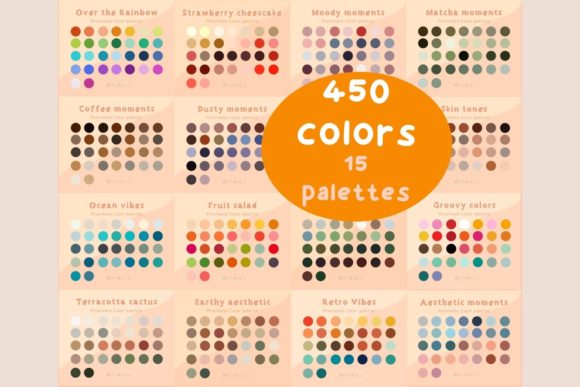
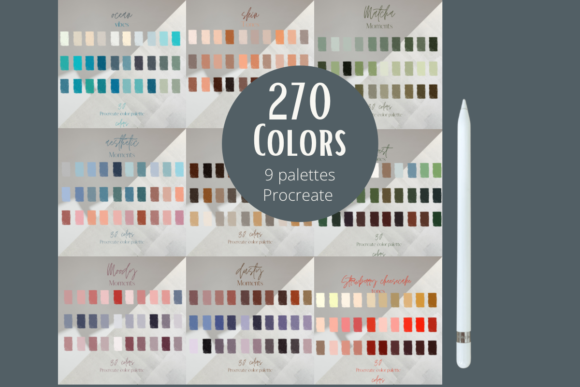
The specific bundle we are exploring offers nine distinct palettes, totaling 270 unique colors. While this might sound like a simple number, the real value lies in how these colors are grouped. They are designed exclusively for the Procreate app, ensuring seamless integration into your existing workflow on iPad. Whether you are a hobbyist sketching on the weekend or a professional illustrator managing tight deadlines, understanding how to leverage these swatches can significantly elevate the consistency and mood of your artwork.
Bridging the Gap Between Concept and Execution
One of the most common hurdles for illustrators is maintaining color consistency across a series of pieces. Imagine you are working on a children’s book or a comic strip. If you pick colors ad-hoc for each page, the final product can feel disjointed. The Procreate Color Palette Bundle solves this by offering cohesive sets. When you select one of the nine palettes, you are committing to a specific visual language. This is incredibly useful for character designers who need their protagonists to look recognizable under different lighting conditions or in various scenes.
Consider the scenario of a freelance graphic designer tasked with creating social media assets for a brand. Brands often have strict guidelines, but sometimes clients want a fresh take within those boundaries. Having access to 270 pre-vetted colors allows the designer to experiment rapidly. Instead of spending hours adjusting saturation and brightness sliders, they can cycle through the provided swatches to see what fits the brand’s voice. This speed is crucial in industries where turnaround time is billed by the hour.
Tailored Benefits for Different Creative Profiles
The utility of this bundle shifts depending on who is holding the Apple Pencil. For beginners, the overwhelming nature of the full RGB spectrum can be paralyzing. A curated bundle acts as training wheels, teaching the eye about complementary and analogous relationships without requiring a degree in color theory. By restricting choices to high-quality combinations, new users learn what works well together by observation and practice.
For seasoned professionals, the benefit is efficiency. Even experts suffer from creative blocks. Sometimes, seeing a unexpected combination of hues in a pre-made palette can spark an idea that wouldn’t have occurred when staring at a blank canvas. The 270 colors included here are not random; they are likely balanced to cover shadows, mid-tones, and highlights effectively within each theme. This means less time mixing and more time rendering textures and details.
Pattern designers and surface pattern artists also stand to gain significantly. Creating seamless repeats requires a delicate balance of contrast and harmony. Using a single palette from this bundle ensures that all elements of the pattern—whether they are floral motifs, geometric shapes, or abstract blobs—feel like they belong to the same family. This cohesion is vital when selling designs for fabric, wallpaper, or stationery, where visual clutter can deter buyers.
Practical Considerations Before You Begin
Before diving in, it is important to understand the technical constraints and strengths of this tool. First and foremost, these colors are only compatible with the Procreate app. If you switch between Procreate on iPad and Photoshop on desktop, you will need to manually recreate these palettes or export them in a universal format if Procreate allows, but the primary design intent is for the iPad ecosystem. This limitation is actually a strength for iPad-only users, as it ensures the swatches are optimized for the touch interface and the specific color rendering engine of the app.
Another consideration is screen calibration. Colors can look different on various iPad models depending on the display technology (LCD vs. Mini-LED) and settings like True Tone. While the bundle provides excellent starting points, always check your work on a calibrated monitor if you are preparing files for print. Digital screens emit light, while printed paper reflects it, so a vibrant neon in Procreate may appear duller in ink. Use these palettes as a foundational guide, but remain aware of your final output medium.
Streamlining Your Workflow: From Download to Canvas
Integrating new tools should not be a chore. The process for getting these 270 colors into your library is designed to be frictionless. You will receive a zip file containing the necessary data. Here is how the process typically unfolds in a real-world setting:
- Download in your browser: After purchasing or acquiring the bundle, locate the download link. Your browser will handle the initial transfer, and you will find the file in your device’s download section.
- Unzip the file: Click on the downloaded zip file. On iOS/iPadOS, this action automatically extracts the contents, revealing the swatch files inside.
- Transfer to Procreate: Tap on the extracted swatch files. Because they are formatted specifically for Procreate, they will automatically trigger the app to open and import the colors directly into your palette library.
This automatic transfer is a significant quality-of-life feature. In the past, artists had to manually input hex codes or drag individual colors, a tedious process prone to error. With this method, you go from download to creation in minutes. Once imported, you can organize these nine palettes within Procreate’s palette menu, keeping them readily accessible for any project.
Maximizing the Potential of 270 Colors
Having 270 colors does not mean you should use all of them in one piece. Effective art often relies on restriction. Try picking just one of the nine palettes for a single illustration. Limit yourself to five colors from that set. This constraint forces you to explore value and composition rather than relying on hue variety. You might find that a limited palette creates a stronger emotional impact than a rainbow of options.
Additionally, these swatches can serve as a base for further customization. Procreate allows you to adjust the hue, saturation, and brightness of any imported color. Use the bundle as a starting point, then tweak specific shades to better suit your lighting needs. This hybrid approach gives you the safety net of professional color grading with the flexibility of personal artistic choice.
Ultimately, the Procreate Color Palette Bundle is about removing friction. It clears the mental clutter of color selection so you can focus on storytelling, texture, and form. Whether you are designing logos, painting landscapes, or sketching characters, having a reliable set of harmonious colors at your fingertips can transform a frustrating session into a flowing, productive creative experience.