Transforming Digital Imagery with the Watercolor Painting Brush Effect
In the evolving landscape of digital art and photography, the line between a standard photograph and a hand-painted masterpiece has become increasingly blurred. Designers, photographers, and hobbyists alike are constantly seeking tools that can infuse organic warmth into sterile digital files. This is where the Watercolor Painting Brush Effect comes into play. It is not merely a filter; it is a sophisticated method of reimagining light, texture, and color through the lens of traditional artistic techniques. By leveraging modern software capabilities, specifically through high-quality templates and actions, creators can achieve stunning results without needing years of training in classical painting.
The Allure of Organic Texture in a Digital World
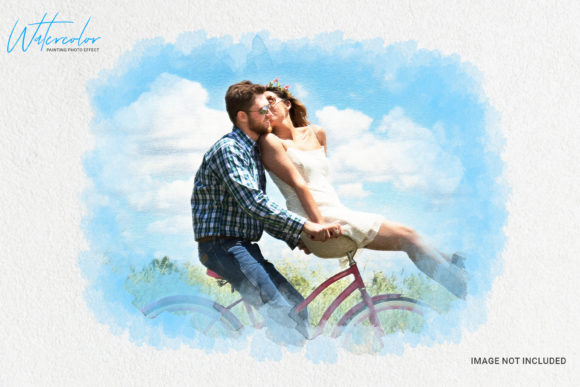
Digital images are often criticized for being too perfect. Every pixel is sharp, every color is uniform, and there is a distinct lack of the happy accidents that define traditional media. The Watercolor Painting Brush Effect addresses this by introducing controlled chaos. It mimics the way pigments bleed into wet paper, creating soft edges, granulation, and unpredictable flow patterns. This aesthetic is particularly popular in wedding photography, editorial design, and social media content where a dreamy, romantic, or nostalgic mood is desired.
When you apply this effect, you are not just changing colors; you are altering the perceived texture of the image. The human eye is drawn to these imperfections because they signal human touch. A photo treated with a watercolor style feels intimate and curated, standing out in a feed saturated with high-contrast, hyper-realistic imagery. This shift in visual language allows brands and individuals to communicate softness, creativity, and elegance without saying a word.
Streamlining Creativity with Smart Actions
For many creatives, the barrier to entry for creating such effects manually is time. Painting over a photo layer by layer in software like Adobe Photoshop can take hours. This is why pre-built solutions, such as the This is Watercolor Photo Effect Template, have become indispensable assets in modern workflows. These templates are designed to automate the complex technical steps while leaving room for artistic customization.
The core of these efficient workflows lies in Smart Object layers. When you use a template built on smart objects, your original image remains non-destructive. You can swap out the source photo, adjust its position, or change its scale, and the watercolor effect will automatically update to fit the new parameters. This flexibility is crucial for professionals who need to process multiple images with a consistent look. Instead of reinventing the wheel for every project, you establish a reliable base and tweak the variables.
Furthermore, these templates typically come with Clean actions and Clean work structures. This means the file organization is logical, with clearly labeled groups and layers. For a designer working under a tight deadline, opening a chaotic, messy PSD file is a nightmare. A well-organized template ensures that you can find the adjustment layers, mask controls, and color balance settings instantly. This level of professionalism in the tool itself translates directly to efficiency in your output.
Technical Precision: Resolution and Quality
One common misconception about digital filters is that they degrade image quality. However, premium watercolor effect templates are engineered to maintain high fidelity. A critical specification to look for is a Resolution of 300 DPI (Dots Per Inch). This standard ensures that the final output is suitable for print. Whether you are creating wall art, greeting cards, or magazine spreads, the texture details of the watercolor brush strokes must remain crisp and defined, not pixelated.
The recommended image size for these actions is usually optimized for high-resolution inputs. Running the first Action on your photo initiates a series of calculations that map the luminance and color data of your image to specific brush textures. If the source image is too small or low resolution, the effect may appear muddy or lack the delicate transparency that defines true watercolor. Therefore, starting with a high-quality source is paramount. The template acts as a multiplier of quality, not a fix for poor input.
Key Features of a Premium Watercolor Template
- Fully Editable: Every aspect of the effect, from the intensity of the brush strokes to the saturation of the colors, should be adjustable. This allows you to tailor the look to match specific brand guidelines or artistic visions.
- Well Organised Layers: Grouped folders for background textures, foreground splatters, and color adjustments make navigation intuitive.
- Non-Destructive Editing: Utilizing masks and smart objects ensures that you can always revert to the original photo or tweak the effect later without losing data.
- High-Resolution Textures: The included brush assets and paper textures should be scanned from real materials to provide authentic grain and tooth.
Integrating the Effect into Modern Workflows
The utility of the Watercolor Painting Brush Effect extends beyond simple photo manipulation. It is a versatile component in broader design projects. For instance, in web design, watercolor elements can be used as background headers to soften the rigid grid structure of a website. In packaging design, these effects can add a handmade, artisanal feel to product labels, suggesting natural ingredients or careful craftsmanship.
Consider the workflow of a wedding photographer. After culling hundreds of images, they need to deliver a cohesive album. Using a standardized watercolor action allows them to apply a consistent artistic theme across the entire collection. They can run the action, adjust the opacity of the effect layer to suit the lighting of each specific photo, and export. This batch-processing capability, combined with individual fine-tuning, strikes the perfect balance between speed and quality.
Moreover, these templates are not limited to photographs. They work exceptionally well with digital illustrations, typography, and vector graphics. By applying a watercolor texture to bold, modern fonts, designers can create a striking contrast between the rigid geometry of the letters and the fluid organic nature of the paint. This juxtaposition is a powerful tool in contemporary graphic design, appealing to audiences who value both modernity and tradition.
Choosing the Right Tool for Your Needs
When selecting a watercolor effect template, there are several factors to consider. First, evaluate the versatility of the brushes included. Some templates offer only one type of wash, while others provide a variety of dry brush, wet-on-wet, and splatter effects. A diverse toolkit allows for more nuanced compositions. Second, check the compatibility with your version of Photoshop. While most modern actions are backward compatible, it is always wise to verify system requirements.
Another important consideration is the learning curve. Even with automated actions, understanding how to manipulate masks and blending modes will elevate your results. Look for templates that include documentation or video tutorials. A Fully Editable file is only useful if you know how to edit it. The best resources empower users to understand the underlying mechanics, turning a simple preset into a springboard for deeper creative exploration.
Ultimately, the goal is to enhance your visual storytelling. The Watercolor Painting Brush Effect is not about hiding the subject of your photo but about revealing its emotional core. By stripping away the harshness of digital precision and replacing it with the gentle unpredictability of water and pigment, you invite the viewer to linger, to feel, and to imagine. Whether you are a seasoned professional or an enthusiastic beginner, integrating these tools into your arsenal can open up new avenues for expression and efficiency.
Remember, technology is the vessel, but creativity is the content. Use these clean, organized, and high-resolution tools to handle the heavy lifting, freeing your mind to focus on composition, color theory, and narrative. The result is not just a processed image, but a piece of art that resonates with the timeless appeal of hand-painted beauty.