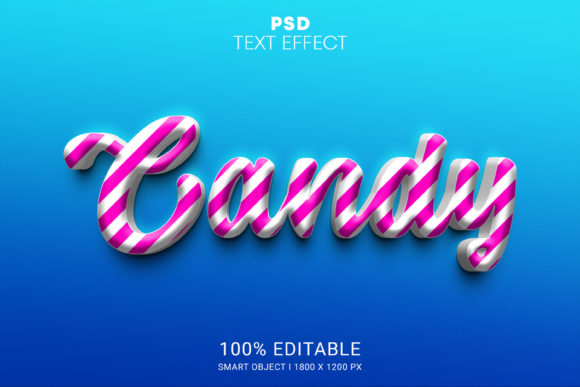
Streamlining Design Workflows with the Candy PSD Editable Text Effect
In the fast-paced world of digital marketing and content creation, visual consistency often battles against the constraint of time. Designers, marketers, and small business owners frequently find themselves needing high-impact typography for social media posts, promotional banners, or product packaging without the luxury of spending hours on manual layer styling. This is where specialized assets like the Candy PSD Editable Text Effect become valuable tools in a professional’s arsenal. Rather than serving as a mere shortcut, this resource represents a shift toward efficient, template-based design that maintains high aesthetic standards while minimizing technical overhead.
The core appeal of this asset lies in its accessibility. It is designed for users who need professional-grade results but may not possess advanced proficiency in Adobe Photoshop’s complex blending options and layer styles. By leveraging smart object technology, the Candy PSD Editable Text Effect allows for rapid customization, ensuring that the final output looks polished regardless of the user’s skill level. This article explores the practical features, usability, and real-world applications of this design tool, helping you determine if it aligns with your creative workflow.
Understanding the Technical Foundation
At its heart, the Candy PSD Editable Text Effect is a pre-configured Photoshop file that utilizes non-destructive editing techniques. The primary mechanism behind its ease of use is the Smart Object feature. In traditional text effect creation, a designer might spend considerable time adjusting bevels, embossing, shadows, and color overlays manually. With this PSD, those settings are locked into a smart container. Users simply double-click the smart object layer, type their desired text or paste an image, save, and the main document updates automatically to reflect the changes with all stylistic elements intact.
This method ensures that the integrity of the design remains consistent. Whether you are changing a single word or an entire phrase, the lighting, texture, and dimensional qualities of the "candy" aesthetic remain uniform. The file is delivered in a .zip format, which typically includes the main PSD file along with high-resolution JPG previews. This packaging allows users to verify the quality and style before opening the project, streamlining the selection process for busy professionals.
Key Features and Usability
The effectiveness of any design template is measured by how well it balances flexibility with structure. The Candy PSD Editable Text Effect excels in several key areas that contribute to its practical value:
- No Skill Requirement: The most significant advantage is the removal of the technical barrier. You do not need to understand how to construct complex layer styles or manage blending modes. If you can type text and save a file, you can use this asset effectively.
- Well-Organized Layers: A common frustration with downloaded PSDs is chaotic layer structures. This file addresses that by keeping layers neatly arranged in folders. This organization is crucial for users who may need to tweak background elements or adjust the position of the text independently of the effect.
- High-Quality Output: The effect is rendered at a resolution suitable for both digital and print applications. The textures used to create the glossy, sugary look are detailed, avoiding the pixelation or blurriness often found in lower-quality freebies.
- 100% Editable: While the style is preset, the content is fully under your control. You can change colors, fonts, and sizing within the smart object, allowing for brand alignment without breaking the visual theme.
These features collectively reduce the time spent on repetitive tasks. For a freelancer managing multiple client accounts, this efficiency translates directly into higher productivity and the ability to take on more projects without compromising quality.
Practical Applications in Professional Contexts
Who benefits most from the Candy PSD Editable Text Effect? The answer extends beyond graphic designers. Its utility spans various professions where visual communication is key.
Marketers and Social Media Managers can use this effect to create eye-catching headlines for Instagram stories, Facebook ads, or Pinterest pins. The playful, vibrant nature of the candy style is particularly effective for promotions related to food, beverages, children’s products, or seasonal sales events like Halloween or Valentine’s Day. The ability to quickly generate multiple variations of a headline allows for A/B testing different copy without redesigning the entire graphic.
Small Business Owners and Entrepreneurs often wear many hats, including that of the designer. For those launching a new product line, especially in the confectionery or lifestyle sectors, this template provides a cost-effective way to produce professional-looking mockups and promotional materials. Instead of hiring a designer for every minor update, they can maintain brand consistency in-house.
Educators and Content Creators may find this tool useful for making learning materials more engaging. Bright, textured text can help highlight key concepts in presentations, worksheets, or video thumbnails, capturing the attention of younger audiences or adding a fun element to otherwise dry content.
Evaluating Quality and Long-Term Value
When assessing the long-term value of a digital asset, one must consider its versatility and reliability. The Candy PSD Editable Text Effect is built on standard Photoshop features, meaning it is compatible with most recent versions of the software. This compatibility ensures that the file will remain usable even as software updates occur, provided the core smart object functionality remains unchanged.
The quality of the effect itself is notable for its realism. The interplay of light and shadow creates a three-dimensional appearance that adds depth to flat designs. However, it is important to note that while the effect is high-quality, it is also stylistically specific. It works best for projects that call for a fun, whimsical, or sweet aesthetic. It may not be suitable for corporate reports, legal documents, or minimalist luxury brands where subtlety is preferred. Understanding this limitation is key to using the tool effectively.
Furthermore, the inclusion of JPG files in the zip package serves a dual purpose. It acts as a quick reference for the user and can be used for immediate low-fidelity drafts if Photoshop is not readily available. This attention to detail in the file structure reflects a professional approach to asset creation, enhancing the overall user experience.
Making the Right Choice for Your Workflow
Integrating the Candy PSD Editable Text Effect into your workflow requires a clear understanding of your project needs. If you frequently create content that benefits from bold, playful typography, this asset is a logical investment. It eliminates the guesswork involved in creating complex text effects from scratch, allowing you to focus on messaging and layout rather than technical execution.
For those new to Photoshop, this tool serves as an excellent learning aid. By examining the organized layers and seeing how the smart object interacts with the main composition, users can gain insights into how professional effects are constructed. This educational aspect adds another layer of value, transforming a simple template into a resource for skill development.
In conclusion, the Candy PSD Editable Text Effect is a practical, high-quality solution for anyone looking to enhance their visual content with minimal effort. Its combination of ease of use, professional organization, and versatile editing capabilities makes it a reliable addition to the toolkit of marketers, designers, and creators. By leveraging such specialized assets, professionals can maintain high standards of visual appeal while optimizing their time and resources for more strategic creative tasks.