Spring Bloom Procreate Color Swatches: A Curated Palette for Digital Artists
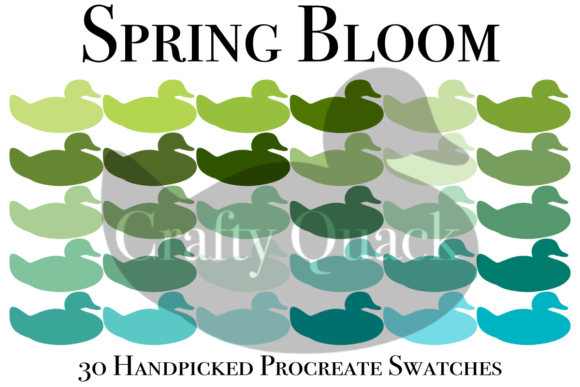
Digital illustration often begins with a blank canvas and the daunting task of color selection. For many artists, especially those working within the Procreate ecosystem on iPad, finding the right tonal balance can consume more time than the actual drawing process. This is where curated resources like Spring Bloom Procreate Color Swatches become invaluable. This collection features 30 handpicked Procreate color swatches designed to capture the essence of renewal, growth, and vibrancy associated with the spring season. It is not merely a list of hex codes but a functional tool integrated directly into the Procreate interface, allowing for immediate application in your workflow.
Bridging the Gap Between Inspiration and Execution
The primary value of this palette lies in its ability to streamline the creative process. When you are in the flow state, stopping to adjust hue, saturation, and brightness sliders can disrupt your momentum. The Spring Bloom set offers pre-balanced combinations that work harmoniously together. These 30 colors range from soft pastels reminiscent of cherry blossoms to deeper, earthy greens that ground a composition. By using these swatches, you ensure that your artwork maintains a cohesive visual language without needing advanced color theory knowledge.
Consider the scenario of a freelance illustrator working on a tight deadline for a lifestyle blog. The client requests imagery that feels fresh, optimistic, and light. Instead of building a palette from scratch, the artist can load the Spring Bloom Procreate Color Swatches and immediately begin sketching with confidence. The colors are already vetted for harmony, reducing the risk of clashing tones that might require extensive post-processing or revision.
Real-World Applications Across Industries
While the name suggests a seasonal theme, the utility of these swatches extends far beyond holiday-specific art. Various professionals and hobbyists can leverage this tool in distinct ways:
- Social Media Content Creators: Influencers and brand managers often need consistent aesthetics for Instagram stories or Pinterest pins. The soft, inviting tones of this palette are perfect for creating visually appealing graphics that stand out in a crowded feed without being overly aggressive.
- Wedding and Event Designers: Digital mood boards are a standard part of the planning process. Using these swatches, designers can quickly mock up floral arrangements, table settings, or invitation suites that reflect a springtime wedding theme. The compatibility with Procreate allows for easy sharing and annotation directly on the iPad.
- Children’s Book Illustrators: The gentle nature of the colors makes them ideal for storytelling aimed at younger audiences. The palette avoids neon harshness, providing a soothing visual experience that supports narrative engagement.
- Fashion and Textile Designers: Before committing to fabric production, designers can use these swatches to visualize pattern repeats and color blocking. The 30-color variety offers enough contrast to create dynamic prints while maintaining a unified look.
Understanding the Technical Constraints
It is crucial to note that this product is compatible only with Procreate. If you are using Adobe Fresco, Photoshop, or Clip Studio Paint, these .swatches files will not import directly. This limitation is significant for users who work across multiple platforms. However, for those deeply embedded in the Apple iPad ecosystem, this exclusivity ensures seamless integration. The swatches appear directly in your Procreate palette library, ready for use with any brush or tool within the app.
Another critical consideration is screen calibration. Due to the difference in screen settings, colors may appear different on your screen compared to the promotional images or other devices. An OLED display on a newer iPad Pro will render blacks and vibrant hues differently than an older iPad model or a standard LCD monitor. Therefore, it is advisable to view the swatches on the device you intend to create on. If your final output is print-based, always perform a test print. Digital colors are additive (light-based), while print colors are subtractive (ink-based), meaning some of the brighter spring tones may appear muted on paper.
Maximizing the 30 Handpicked Colors
The curation of exactly 30 colors is intentional. It provides variety without causing decision paralysis. To get the most out of the Spring Bloom Procreate Color Swatches, consider grouping them by function rather than just hue. You might identify five core neutrals for backgrounds, ten mid-tones for main subjects, and fifteen accents for highlights and details. This methodical approach helps maintain balance in your composition.
For example, when creating a landscape, you might use the deeper greens for foreground foliage, the softer yellows for sunlight effects, and the pale blues for sky gradients. Because the colors are handpicked to complement each other, layering them with different blend modes in Procreate—such as Multiply, Overlay, or Color Dodge—can yield sophisticated results with minimal effort. This encourages experimentation, allowing artists to discover new textures and depths within their work.
Who Benefits Most from This Tool?
This resource is particularly beneficial for intermediate artists who understand the basics of digital painting but struggle with color harmony. Beginners may find it a helpful training wheel, allowing them to produce professional-looking results while they learn. Advanced artists might use it as a starting point, tweaking individual shades to suit specific project needs. The time saved in color selection can be redirected toward refining line work, adding texture, or enhancing lighting effects.
Moreover, educators teaching digital art can use this palette as a case study. By analyzing why certain colors work well together in the Spring Bloom set, students can learn practical lessons about complementary colors, analogous schemes, and temperature balance. It serves as both a tool and a teaching aid.
Practical Tips for Implementation
Before diving into a major project, spend some time exploring the swatches. Create a simple test file and fill shapes with each color to see how they interact side by side. Pay attention to how they look against white versus dark backgrounds. This preliminary exploration helps build familiarity, making the selection process intuitive during actual creation.
Also, remember that these swatches are static. They do not change based on lighting conditions in your scene. You must still apply artistic judgment regarding light sources and shadows. Use the lighter shades from the palette for areas hit by direct light and the darker shades for occluded areas. This manual adjustment ensures that your artwork retains depth and realism, even when using a predefined color set.
In summary, the Spring Bloom Procreate Color Swatches offer a practical, efficient solution for digital artists seeking inspiration and consistency. By understanding its limitations regarding platform compatibility and screen variance, users can effectively integrate these 30 handpicked colors into their workflow. Whether you are designing social media graphics, illustrating children’s books, or planning event aesthetics, this palette provides a solid foundation for creating vibrant, harmonious digital art.